Dispensary website speed: fixing Core Web Vitals on embedded menus, 2026
Embedded menus slow dispensary websites by delaying LCP, shifting layout and busying the main thread. Targets and fixes, sourced from web.dev.
Dispensary website speed on a menu page comes down to three numbers: Largest Contentful Paint (LCP) within 2.5 seconds, Interaction to Next Paint (INP) at 200 milliseconds or less, and Cumulative Layout Shift (CLS) at 0.1 or less. An embedded menu tends to miss them for the same three reasons: it appears after JavaScript runs, it pops into the page late, and its scripts keep the main thread busy. This guide covers how to measure each problem and fix the part you control. It names no vendor numbers, because we found no primary source for any, so measure your own page.
Before you start
What you are measuring
web.dev's Web Vitals page, last updated October 31, 2024, sets the targets. In its words, "LCP should occur within 2.5 seconds of when the page first starts loading," "pages should have a INP of 200 milliseconds or less," and "pages should maintain a CLS of 0.1. or less."
A page passes only when it meets the targets at the 75th percentile of page loads, for all three metrics. Mobile and desktop are segmented separately. So three fast visits out of four isn't enough. The slowest quarter of real visits decides the result, and on a dispensary site many of those are on a phone, on a cellular connection, standing outside the store.
Where the time goes on a menu page
web.dev's LCP guide (updated March 31, 2025) splits LCP into four parts:
| Part | Rough share of LCP | What it means |
|---|---|---|
| Time to First Byte (TTFB) | about 40% | Request until the first byte of HTML arrives |
| Resource load delay | under 10% | Gap before the browser starts the LCP resource |
| Resource load duration | about 40% | Download time of the LCP resource |
| Element render delay | under 10% | Gap between download and paint |
A typical embedded menu inflates several of these at once. The page loads, then a script loads, then the script requests product data, then products render. If the largest element on the screen is a product image or the menu itself, every one of those steps sits inside your LCP. This is the generic pattern for any client-rendered embed. How a specific vendor's frame behaves is something to check in your own network panel.
Get field data first
Open PageSpeed Insights for your menu URL and read the field data section before the lab score. Field data reflects real visits at the 75th percentile. A lab run is one load on one simulated device. It's good for debugging and poor for deciding pass or fail. If your site has too little traffic for field data, say so in your notes and use the lab score as a rough guide only.
Step-by-step
1. Make the first screen independent of the embed (LCP)
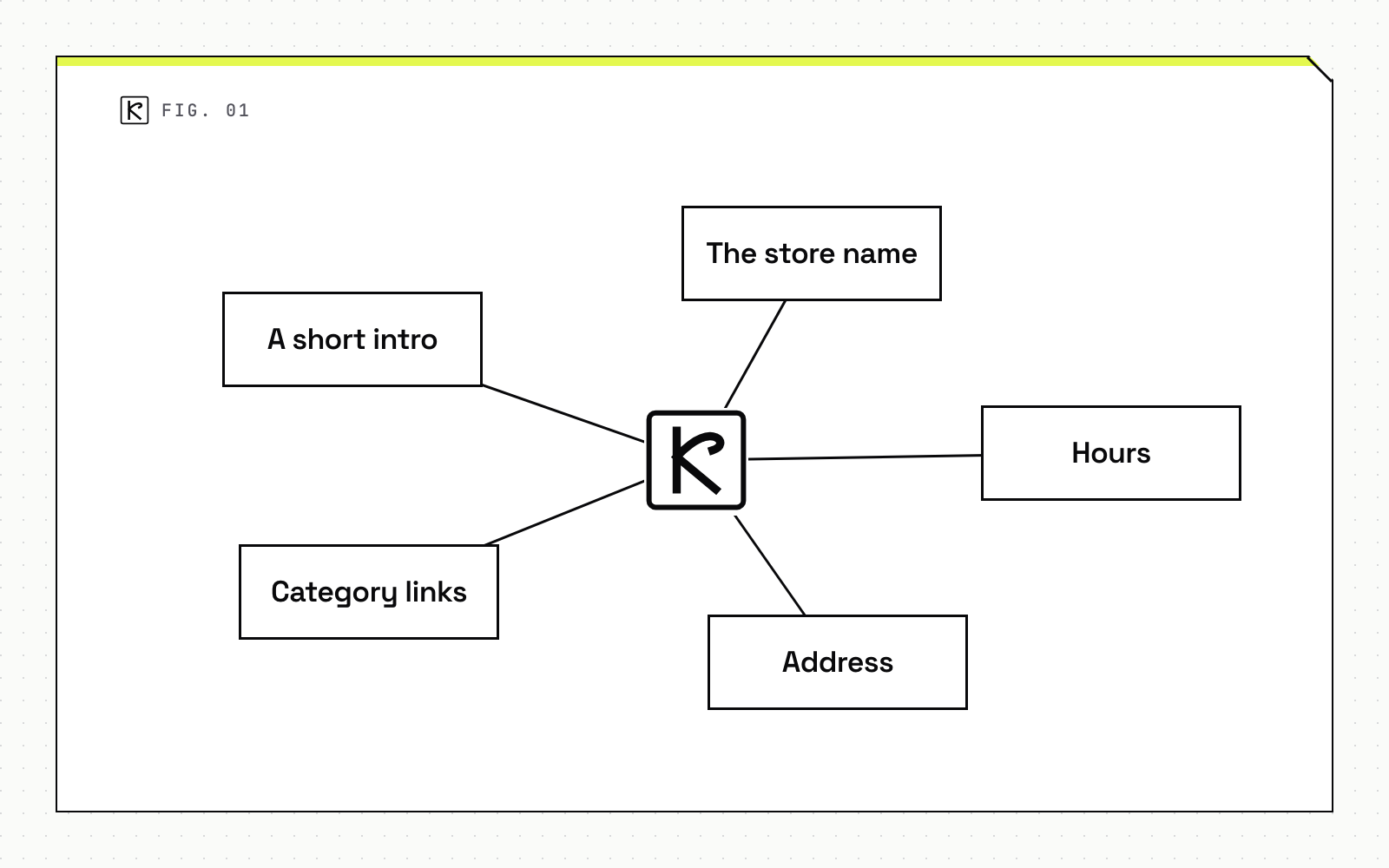
Render the parts that do not need menu data on the server: the store name, hours, address, category links and a short intro. web.dev recommends server-side rendering or prerendering "so content doesn't wait on JavaScript," and that the LCP resource be discoverable in the initial HTML.
Two rules from the same guide apply to images. Never lazy-load the LCP image. And use fetchpriority="high" on only one or two images, since marking everything high priority means nothing is. For formats and sizing, see our article on image formats and lazy loading that do not hurt LCP.
If the menu itself is the LCP element, you cannot avoid waiting for it. You can still move the LCP element: put a server-rendered hero or heading above the menu so the largest paint is something you control.
2. Reserve space for the menu (CLS)
An iframe or injected menu that arrives late pushes everything below it down. web.dev's CLS guide (updated February 7, 2025) says to reserve space for late-loading content: "One approach is to add a min-height CSS rule to reserve space," or use aspect-ratio for responsive content.
Do not collapse the space if nothing loads. The guide advises showing a placeholder, because removing reserved space shifts the page as much as inserting content does. It also notes that dynamically injected content "closer to the top of the viewport usually causes greater layout shifts," so keep late content lower on the page when you can.
One caveat from the same page: iframe layout shifts cannot be measured through Web APIs, so some field tools may understate them, although the Chrome User Experience Report (CrUX) includes them. If a script-based monitor says your CLS is fine and PageSpeed Insights says otherwise, trust CrUX.
3. Load the embed on purpose
If the menu sits below the fold, add loading="lazy" to the iframe. web.dev's iframe guide (updated September 23, 2024) says it "defers offscreen iframes from being loaded until the user scrolls near them," and that omitting the attribute behaves like loading="eager". The guide cites Chrome research with 2-3% median data savings and 1-2% median First Contentful Paint reductions. Those are modest, general figures, not a promise for your page.
If the menu is the main content of the page, do not lazy-load it. That delays the thing visitors came for, and likely your LCP too.
For third-party scripts, web.dev's third-party JavaScript guide says to load them asynchronously unless they must run before render. Use async for scripts needed early and defer for less critical ones. It also says an early connection to an important third-party origin can save 100 to 500 ms.
That's what rel="preconnect" does. The preconnect guide adds a limit: "Only preconnect to critical domains you will use soon," because browsers close unused connections after 10 seconds and too many hints cause bandwidth contention. Preconnect to the menu's one origin, not to every tag on the page.
Mind the dates. Both the third-party and preconnect guides were last updated in 2019. The principles still hold, but test the effect instead of assuming 100 to 500 ms.
4. Protect the main thread (INP)
web.dev's INP guide (updated September 2, 2025) explains that "depending on the size of a script, this work can introduce long tasks on the main thread," which delay responses to taps and clicks. Input delay also comes from script loading, parsing and compiling, timers and overlapping interactions.
Practical moves on a menu page:
- Remove tags the menu page does not need. Every extra script competes with the menu for the main thread.
- Delay chat widgets and similar add-ons until the visitor interacts.
- Keep your own click handlers small. The guide says to split work into separate tasks, and that "yielding indiscriminately is better than not yielding at all."
- Test filters, category tabs and add-to-cart buttons on a mid-range phone, not only on a laptop.
That guide does not give separate rules for third-party scripts, so treat these as applications of the general advice, then verify with measurements.
5. Re-measure
Change one thing at a time and keep a short changelog with dates. Field data at the 75th percentile moves slowly, because it covers a rolling window of real visits. Compare before and after on the same metric, the same device class and the same page. If lab numbers improve and field numbers do not after a few weeks, the fix helped the test, not your visitors.
Common mistakes
- Lazy-loading everything. The first-screen image and the main menu should load eagerly. Only offscreen embeds should wait.
- Chasing the lab score. A green lab run on a fast laptop says little about the 75th percentile on a phone.
- Preconnecting to a long list of origins. Unused connections close after 10 seconds and the extra hints compete for bandwidth.
- No reserved space. Add a banner or age notice above the menu after launch and CLS climbs.
- Treating the vendor frame as untouchable. You cannot change code inside it, but you control everything around it: the shell, the placeholder, the timing and the other tags on the page. If the frame itself is the bottleneck, measure it and take the numbers to the vendor.
Speed also feeds into search. If you run several stores, the structure question comes first, and we cover it in multi-location dispensary SEO. If your menu page needs a rebuild around server rendering, that is the kind of work we do under web development, or you can contact us with the page URL.
Frequently asked questions
What counts as a good Core Web Vitals score for a dispensary site?
web.dev sets LCP within 2.5 seconds, INP at 200 milliseconds or less and CLS at 0.1 or less, judged at the 75th percentile of page loads. A page passes only when all three meet the target.
Should I lazy-load my menu iframe?
Only if it sits below the fold. If the menu is the largest element on the first screen, lazy-loading delays LCP. web.dev says never to lazy-load the LCP image, and the same logic applies to the main content of the page.
Why does my lab score look fine while field data fails?
Lab tools run one load on one device. Field data is the 75th percentile of real visits. web.dev also notes that iframe shifts cannot be measured through Web APIs, so some tools understate them while CrUX includes them.
Can I fix a slow menu I do not control?
Partly. You control the page around it: space reservation, load timing, connection hints and what else competes for the main thread. What runs inside the vendor frame is the vendor's code, so measure it and raise it with them.